
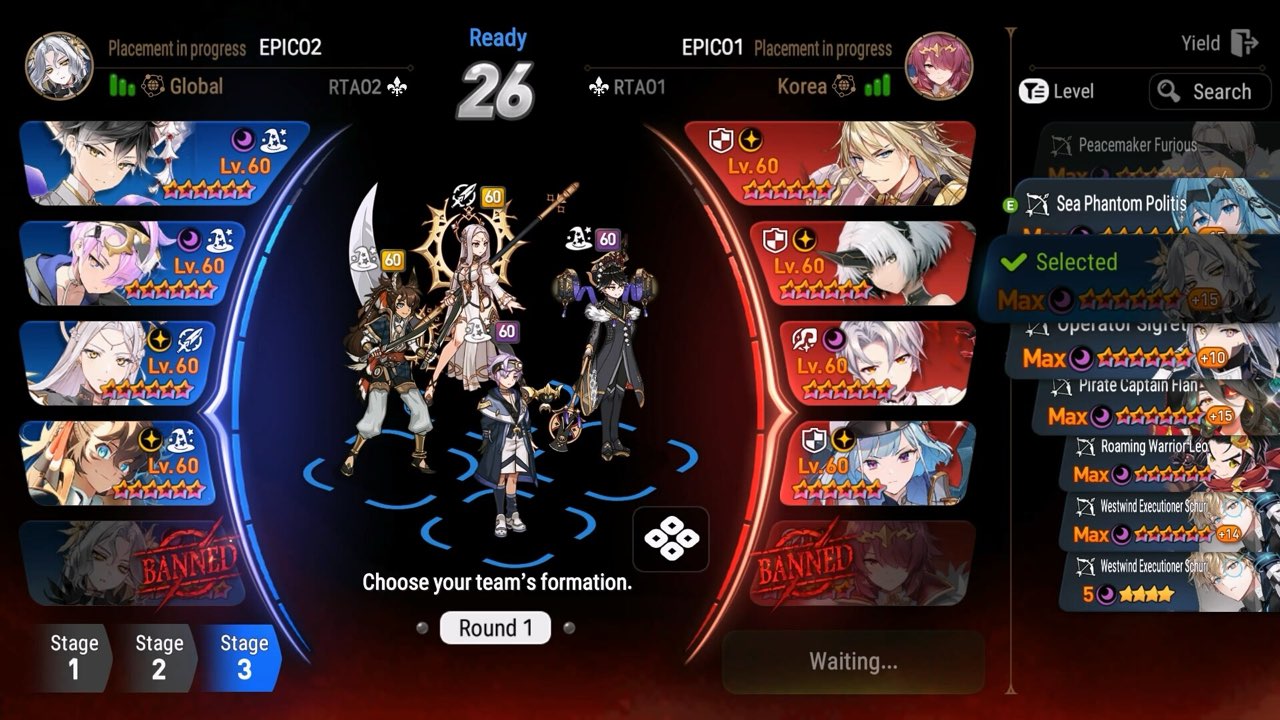
Checking Your Match History In-Game
Your own recent World Arena battles are listed in-game. According to the developer of the E7 RTA Archive, the game only shows about the last 100 battles, so older matches drop off as you play. Spectator Mode is currently disabled from October 31 to November 14, 2026, until the Fall 2026 season ends.
Other battle logs work differently. Guild War battle logs, for example, were deleted with the October 29, 2026 update, so do not rely on the game to keep long-term records.
Looking Up Any Player Online
Hideout Gacha's RTA History Lookup credits STOVE as its data source. Choose a server (Korea, Asia, Global, Europe or Japan) and type the player's nickname. The player page shows their current league and Victory Points, ladder percentile, season wins and losses, and their five most-played heroes with records.
Each recent match lists both drafts with bans, the result, the length in time and turns, points won or lost, and who picked first. This makes it easy to study a top player's pre-bans and first picks before facing them.
- Pick a server: Korea, Asia, Global, Europe or Japan
- Enter the player's in-game nickname
- Review league, VP, season record and top 5 heroes
- Open a match to see both drafts, bans and first pick
Hero Analysis and Rankings
The same tool has a Hero Analysis section with pick, win and ban rates by season and league, the gear sets players most often use on a hero, and its counters and best partners. You can filter by element, class and star rating. A Ranking tab lists top World Arena players by server or by hero, updated daily.
Use these numbers alongside our tier list and RTA guide. Win rates reflect how a hero performs in real drafts, which is often more useful than opinion-based rankings.
Archiving More Than 100 Battles
The E7 RTA Archive was built to keep RTA history beyond the roughly 100 battles the game shows. It can query by server or player ID, accept uploaded JSON, automatically query new battles, and show season stats such as win rate and first-pick rate. You can also export your battle table.
If you want long-term records, query your account regularly during a season so no battles are lost. Exported tables are useful for spotting which matchups cost you the most points.
Smilegate's Official Site
Community tool roundups list Smilegate's own E7 match-history site at epic7.gg.onstove.com. When we checked on October 31, 2026, it returned an error (HTTP 503), so the community tools were the working option.
Because third-party tools depend on STOVE data, they can break when Smilegate changes something. If a lookup fails, try again later or check the official Epic Seven website for notices.
Using Your History to Improve
Look for patterns in your losses: which hero you lose to most, whether you lose more on second pick, and how long losing games last. Coach Valky reviews drafts this way, noting how pre-bans shape what you can play. Hold-press heroes during the draft to check the opponent's stats.
Then adjust your pre-bans and gear. Our CR check guide explains speed tuning, and the builds guide covers stats for each role.
Tips for Scouting Opponents
Before a big match or tournament, look up your opponent's last few drafts. Note their usual pre-bans, which hero they first-pick, and whether they play speed cleave or slower tank comps. Coach Valky's drafts show how much a player's pre-ban shapes their whole account.
During the draft itself, hold-press each enemy hero to see its stats. Combined with their match history, this tells you who is faster and which counters are worth picking.
Frequently Asked Questions
Is RTA match history public?
Community tools read World Arena data from STOVE, so any player's recent drafts and results can be looked up by nickname and server.
Which servers can I search?
Korea, Asia, Global, Europe and Japan.
How do I see my match history in Epic Seven?
Your recent World Arena battles are shown in-game, roughly the last 100. Community lookups show more detail for any player.
Can I look up another player's RTA games?
Yes. Tools like Hideout Gacha's RTA History Lookup let you pick a server and enter a nickname to see their drafts, bans and results.
How do I keep more than 100 RTA battles?
Use an archive tool such as the E7 RTA Archive, which stores and exports your battle history.
Official Video
Sources and Further Reading
- Hideout Gacha — Epic Seven RTA history lookup
- E7 RTA Archive — RTA history beyond 100 battles
- Epic Seven — official announcements on Steam (Smilegate)